
Answers, Config VM: IPv6 Static Routes
This post answers an earlier config VM piece that asked you to confiugre some IPv6 static routes. (Turns out I forgot to post the answer, so… here it is!) Since it has been so long, if you’re thinking “huh?”, click that link, check out the original config VM lab, and then read the answer here. And there’s a little hidden practice for how to shorten IPv6 addresses. Answer is below the fold; here are some quick links:
- More info on IPv6: Chapter 19 of the ICND2 Official Cert Guide…
- More Config VM labs
Static Routes for LAN Subnets, Plus Extra Work
Check the original post for the requirements. Here sit the answers! Ask questions if you have them.
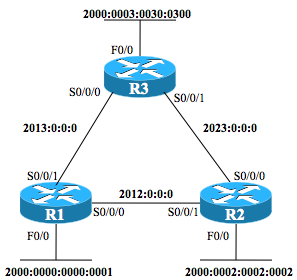
By the way, if you build this in your lab, you should be able to ping the LAN IPv6 address of the other routers in the triangle successfully. Figure 1 repeats the original network diagram for reference.
Figure 1: Router Triangle with IPv6 Addresses
Example 4: R1 IPv6 Static Routes
ipv6 route 2000:2:2:2::/64 2012::2
ipv6 route 2000:3:30:300::/64 2013::3
Example 5: R2 IPv6 Static Routes
ipv6 route 2000:0:0:1::/64 2012::1
ipv6 route 2000:3:30:300::/64 2023::3
Example 6: R3 IPv6 Static Routes
ipv6 route 2000:0:0:1::/64 S0/0/0
ipv6 route 2000:2:2:2::/64 S0/0/1