
Answers: Subnet Design Exercise 3
Today’s post shows the solution to subnet design exercise 3, specifically the IP subnets. This post isn’t all that meaningful without reading the other one first – after that, and after you take a crack at creating the design yourself, dive in! Here are some useful links:
- The original problem statement for this problem
- The ICND1 Cert Guide, where Chapters 16 and 18 help you find the answers
- All the Subnet Design Exercises in this Blog
Mask Design
First, let’s look at the design of the subnet mask.
The figure shows a need for 6 total subnets, and all subnets will come from class B network 172.24.0.0. To support 6 subnets, you need at least 3 subnet bits, because you need 2^S to be at least as big as the number of required subnets. So the minimum workable S (number of subnet bits), per the various requirements, is S=3.
The requirements also tell you to use a single mask throughout each classful network. In other words, avoid Variable Length Subnet Masks (VLSM). A lot of people miss this concept, so it’s worth a few words. VLSM means: more than 1 mask is used inside one classful network. That is, more than 1 mask is used inside a single class A, B, or C network. In this case, the requirements tell us to use a single mask throughout each classful network, so VLSM is not used. From a design perspective, that means we need to pick one subnet mask to use in all subnets.
Next, look at the requirements for the number of subnets. Figure 1 repeats the requirements for the number of hosts per each subnet.
Figure 1: Network Diagram and Requirements
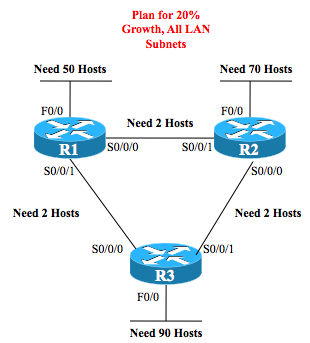
Because of the requirement to use one mask, and one mask only, you can ignore all the subnets except the subnet with the largest number of hosts. In this case, that subnet, R3’s LAN subnet, has a need for 90 hosts. Analyzing the various requirements:
- The largest subnet requires 90 hosts today
- The requirements said to plan for 20% growth in hosts
- We should plan for 90 + 18 = 108 hosts in the largest subnet
- Find the smallest value H for which 2^H – 2 is at least 108; in this case, that value, H=7, is the minimum number of host bits
To wrap up the mask design, note that the design uses one class B network. As a class B network, the network always has 16 network bits, by definition. So a mask that meets all requirements will have:
- Network bits: 16
- Subnet bits: at least 3
- Host bits: at least 7
Finally, the requirements also told us to use the fewest number of host bits. So, the mask has exactly 7 host bits.
How to write that mask? In prefix notation, it’s /25, calculated from 32 (the number of bits in the mask) minus H (the number of host bits). To find the dotted decimal notation (DDN) mask, just covert /25 to DDN format, or 255.255.255.128.
Find All Subnets
Once you know the mask, the next step in the design process is to find all the subnets that exist. You can then compare the list to the requirements, which tell us to use the numerically low subnet IDs for the WAN subnets, and the numerically high subnets for the LAN links. I’ll leave the how as an exercise, but here’s the list, with low and high ends. Note that the pattern is to use a multiple of 128 in the 4th octet, and add by 1 in the 3rd octet.
172.24.0.0
172.24.0.128
172.24.1.0
172.24.1.128
.
.
.
172.24.254.0
172.24.254.128
172.24.255.0
172.24.255.128
Assign Low Subnets to WAN, High to LAN
The exercise requirements state that the WAN subnets should use the numerically lowest subnet IDs from network 172.24.0.0, starting with the R1-R2 link, then the R2-R3 link, and then the R1-R3 link. Without any reason to avoid it, the zero subnet (172.24.0.0) should be used. So, just pick the first three subnets from the list of subnet IDs.
Similarly, the requirements state that the three numerically highest subnets should be the R1 LAN, R2 LAN, and R3 LAN, in that order. Just pick those from the list from the list.
The final choices for the subnets then are:
Figure 2: Chosen Subnet IDs

- R1-R2 WAN: 172.24.0.0/25
- R2-R3 WAN: 172.24.0.128/25
- R1-R3 WAN: 172.24.1.0/25
- R1 LAN: 172.24.255.128/25
- R2 LAN: 172.24.255.0/25
- R3 LAN: 172.24.254.128/25
Assign Numerically-Highest IP Addresses
The last big task is to create a configuration for each router. Per the requirements, each router should use the last IP address in each subnet. When two routers exist (the WAN subnets), the higher router number gets the higher router IP address. Examples 1, 2, and 3 show the resulting configuration on routers R1, R2, and R3.
Example 1: R1 Configuration
interface F0/0
 ip address 172.24.255.254 255.255.255.128
!
interface S0/0/0
 ip address 172.24.0.125 255.255.255.128
 description R2 uses the very highest address; R1 uses next lower
!
interface S0/0/1
 ip address 172.24.1.125 255.255.255.128
 description R3 uses the very highest address; R1 uses next lower
Example 2: R2 Configuration
interface F0/0
 ip address 172.24.255.126 255.255.255.128
!
interface S0/0/0
 ip address 172.24.0.253 255.255.255.128
 description R3 uses the highest address; R2 uses the 2nd highest
!
interface S0/0/1
 ip address 172.24.0.126 255.255.255.128
 description R1 uses the 2nd highest address; R2 uses the very highest
Example 3: R3 Configuration
interface F0/0
 ip address 172.24.254.254 255.255.255.128
!
interface s0/0/0
 ip address 172.24.1.126 255.255.255.128
 description R1 uses the 2nd highest address; R3 uses the very highest
!
interface S0/0/1
 ip address 172.24.0.254 255.255.255.128
 description R2 uses the 2nd highest address; R3 uses the very highest