
IOS DHCP Server Config – Answers
Can you configure an IOS DHCP server from memory? Set up the DHCP pools, configure the correct subnet and mask, define the default gateway and DNS addresses, and exclude IP addresses as needed? And not add any extra or meaningless commands? Those are some of the requirements to get this latest practice question correct. Read and answer the question on your own first, and then read this post for the explanation.
The Answers:
A, C
The Dilemma of Answers A and B: Which network Command?
Two answers offered options for the network command in DHCP pool mode:
network 172.16.2.0 /24
network 172.16.2.128 /25
The two options compete, and you would need at most one of the two. The first option matches all addresses in the subnet (subnet 172.16.2.0/24), while the other matches all addresses in the upper half of the subnet (address 172.16.2.128 – 172.16.2.255). Both concepts exist in the question: The entire subnet, and the design goal of assigning addresses from the upper half of the subnet only. Basically, part 1 of this question makes you consider:
which network command works for that requirement?
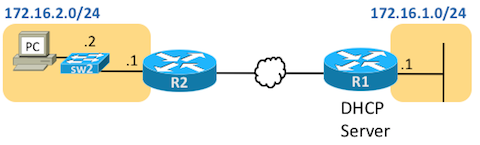
Figure 1: The Network for the DHCP Server Question
The Dilemma of Answers C and D: Excluding the Router’s Address?
Answers C and D create a second dilemma, so that you would again choose at most one of the two answers. These answers basically ask whether the IOS DHCP server configuration must exclude the router’s IP address.
First, used loosely, the term “exclude” means that the DHCP server would not offer the address to a DHCP client. More specifically, the term “exclude” can refer to addresses configured with the ip dhcp excluded-address command so that the DHCP server does not offer to lease the address. Clearly, any statically-configured IP addresses in a subnet, like the pre-configured static IP address of the router or switch in the subnet, should be excluded. However, in this case:
- Does the definition of R2 as the default gateway in the subnet, with the default-router 172.16.2.1 command in DHCP pool mode, already cause the DHCP server to exclude the address? That is, do you need to configure the default router’s address in an ip dhcp excluded-address command?
- If you chose the network 172.16.2.128 /25 command (answer B), which implies a range from 172.16.2.128 – 172.16.2.255, would you need to then exclude the router’s IP address of 172.16.2.1, which isn’t even in that range?
Two Key Facts: Correct Mask and Exclude the Router Address
The CCENT EPL video 9.3 I mentioned in the question post (available free as a preview) speaks to both these points. The shorter version:
Use the correct subnet mask in the IOS DHCP configuration for proper DHCP server operation. That is, use the same mask used in the actual subnet. That’s because of how the DHCP Discover message’s source IP address helps the IOS DHCP server identify the IOS DHCP Server’s pool to use.
For instance, with answer B in this case, DHCP requests from subnet 172.16.2.0 would arrive at the IOS DHCP server on R1 with a source IP address of 172.16.2.1. R1’s configuration with the /25 mask would not include address 172.16.2.1 in its range. So, the IOS DHCP server would not match that request to the pool and would not service that request. However, answer A’s network 172.16.2.0 /24 command, which implies a range from 172.16.2.0 – 172.16.2.255, would include address 172.16.2.1, so the DHCP server would see the source address of the request in the DHCP pool, identify the correct pool, and service the request.
Exclude R2’s IP address using a command. The IOS DHCP server does not automatically exclude the IP address of the default router, even with the configuration of the default-router 172.16.2.1 command in this case. The configuration should exclude it using the ip dhcp excluded-address command. (That makes answer C correct, and answer D incorrect.)
Perspective: A Complete Configuration
Just to complete the discussion, consider this completed IOS DHCP server config for router R1.
ip dhcp excluded-address 172.16.2.1 172.16.2.127
!
ip dhcp pool swimming
  network 172.16.2.0 /24
  dns-server 172.16.1.10
  default-router 172.16.2.1
R1’s DHCP Server Configuration to Support Subnet 172.16.2.0/24
Note that the IOS DHCP server never assigns the subnet ID nor subnet broadcast address, so these addresses do not need to be listed in ip dhcp excluded-address commands. The configuration then reserves the rest of the lower half of the address range, leaving 172.16.2.128 – 172.16.2.254 available for lease by the DHCP server. Figure 2 shows the idea visually.
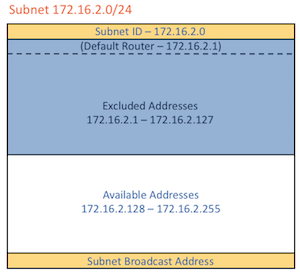
Figure 2: R1’s DHCP Server Configuration to Support Subnet 172.16.2.0/24