
CML Free Edition: Migrating the Config Labs
Over the years, I’ve created a bundle of about 75 lab exercises here at the blog, called Config Labs. The idea is to read the web page for the lab, then do the lab, and then check your answers on that same web page. You can do the lab on paper, or with Cisco Packet Tracer (CPT), or Cisco Modeling Labs (CML) Personal edition (CML-Personal).
But honestly, CPT was far more popular than CML-Personal, in part because CPT is free, and CML-Personal isn’t.
Fast forward to today, with CML Free Edition (CML-Free). Yes, it’s free! And folks like you might want to use these Config Labs with CML-Free. But that requires some work to migrate the labs, because the files I created for CML-Personal back in the day don’t work with CML-Free.
This blog post gives the details of what to expect for the migration!
Config Lab History
To appreciate what I’m doing here in 2025, it helps to look back briefly:
- 2015-2016: Initial release of the first batch of labs. All labs were designed to be solved without any lab tool, writing your answers on paper or in a text editor.
- 2020: Added more labs. Also, most labs were converted to work with Cisco Packet Tracer (CPT), which, by that time, Cisco had made available to everyone for free. I converted the lab exercises to show figures and configurations that matched the interface IDs in the supplied Packet Tracer files.
- 2021: Extended the labs to add support for CML-Personal. That included a tab with details about the interface IDs (IIDs) used in the supplied CML file, which were different from the lab and CPT files due to differences in the tools.
CML-Free Migration Plan
Here in 2025, I’ve set about to update some of the labs to support both CML-Free and CML-Personal editions. The original files I created back in 2021, for CML-Personal, do not work with CML-Free. But CML-Free, well, it’s free, and the CLI experience is very realistic compared to real devices. Using CML-Free as part of your CCNA study can be very helpful, so I want to help people with some lab exercises.
So here’s the general outline of my plan for the 2025 migration:
- Update about 20 (of the 75 or so) Config Labs to support CML-Free and CML-Personal.
- Watch usage statistics to see if people use them or not.
- If the usage stats suggest enough interest, I’ll convert another 20.
- I’ll watch the stats for a few more months, then decide whether it’s worth the effort to convert the rest of the labs.
CPT remains the most popular lab learning tool for CCNA, and it will likely retain that position for a while, given the amount of free lab exercises available. However, I think CML-Free will become more popular over time, now that the cost is low.
How to Find CML-Free Labs DURING the Migration
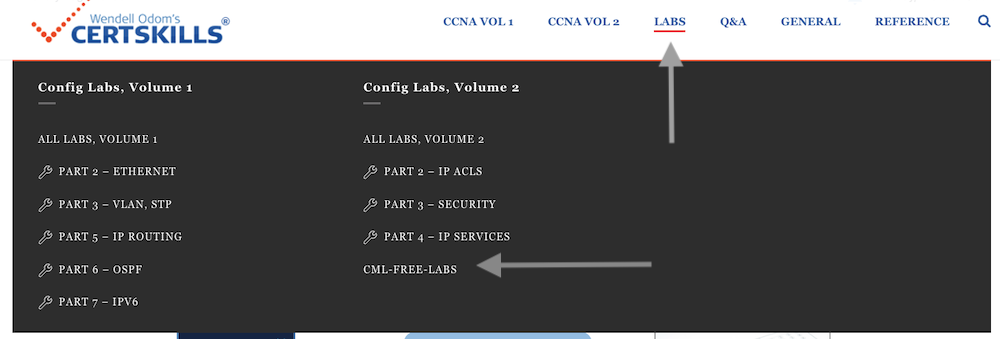
During the migration (2025), you can find all Config Labs that work with CML-Free using a menu item as shown in the following figure. Hover over “Labs” from the top menu to get to the menu. Then look to the lower right of the overlaid menu and click “CML-Free-Labs”.
Also, when looking at any Config Lab page at the blog, you can discover whether it has been migrated to support CML-Free in two different ways. First, if you navigate to the download for the CML file for the lab (filetype: YAML), and import it into CML-Free, and it works, then it’s a lab that’s been migrated! The older CML files I created back in 2021 fail when you try to import them into CML-Free.
Additionally, just look for the heading that mentions CML-Free. To get there:
Look for the “Answer Options” three-tab item found in each lab page, as seen in the next figure.

Click on the “Option 3: CML” tab to reveal the tab contents. If the lab has been migrated, it has a bold heading line that states it supports both CML-Free and CML-Personal, as in the figure below.
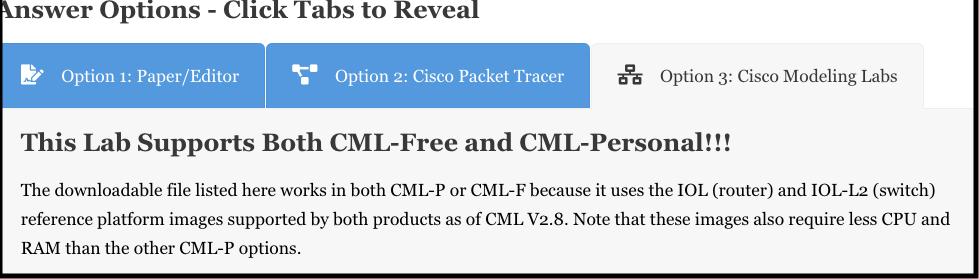
Note that the older labs, which do not support CML-Free, make no mention of CML-Free in the text within this tab area.
How to Find CML-Free Labs AFTER the Migration
Just a heads-up… Eventually, if I migrate most of the Config Labs to support CML-Free, that menu item that lists all labs that support CML-Free will just be a list of all labs. It will be a bit laborious to use. So I plan to remove it at the end of the project. At that point, just look for a lab you’re interested in with the permanent Lab menu items, click the “Option 3: CML” tab, and look at the heading to see if the lab supports CML-Free.
CML-Free and Config Lab Videos!
As part of this push to update the Config Labs, I created some related YouTube videos. Some focus on the tools and best practices for using CML-Free for CCNA. Others focus on a particular Config Lab. I’ve collected them into a YouTube playlist if you want to browse around:
CCNA Labs and Lab Tools Playlist @NetworkUpskill
The following grid shows the first of the CML-focused videos in the series for quick reference:
Available March 5th!
Background: Why Update the Labs? Operating Systems (RefPlats)
The Config Labs supply a CML file (filetype: YAML) that you import into CML so you begin the lab with the same initial configuration and lab topology used in the lab. To help you understand why I decided to update the Config Labs to support CML-Free, let me give you a little background.
Each version of CML supports a number of Cisco devices operating systems. CML refers to these as reference platforms or RefPlats.
- The CML files specify which RefPlat to use. For instance, it might define a three-router triangle, exactly where to place the icons, which interfaces connect to one another, AND the RefPlat (operating system) to use.
- The CML files I created back in 2021 used some then-available RefPlats, e.g., “IOSv” for the router image, which was an IOS (not IOS XE) operating system image.
- Cisco introduced a low-overhead router RefPlat called IOL, and a low-overhead switch RefPlat called IOL-L2, in early 2024.
- Cisco introduced CML-Free in late 2024… which supports IOL as the only router RefPlat, and IOL-L2 as the only switch RefPlat.
- Conclusion: My 2021-era CML files reference RefPlats not available in CML-Free – so you can’t use them effectively w/ CML-Free.
That’s the short version. If you want a longer version, you can check out my YouTube video that introduces CML-Free.
Background: Why Update the Labs? Interface IDs (IIDs)
Cisco Packet Tracer (CPT) wins as the most popular CCNA lab tool, hands down. So I built these Config Lab exercises with the following approach:
- Match CPT’s Conventions: Each lab blog page shows figures and configurations with interface IDs (IIDs) that match what you will see if you do the lab with the supplied CPT file (filetype: .pkt).
- CML users adjust: Each lab page has a tab element about how to do the lab: With a text editor, CPT, and CML. The CML tab tells CML users how to adjust from the IIDs used in the blog figures/configs to what they will see doing the lab in CML.
- For CML-Free, update the CML files to use the updated IIDs: The router and switch operating systems (RefPlats) available with CML-Free – IOL and IOL-L2 – use different IID numbering patterns than the other CML RefPlats. So, I need to update the Config Lab page for each lab to give you correct information about what IIDs you should see when using CML.